Goals (🎯)
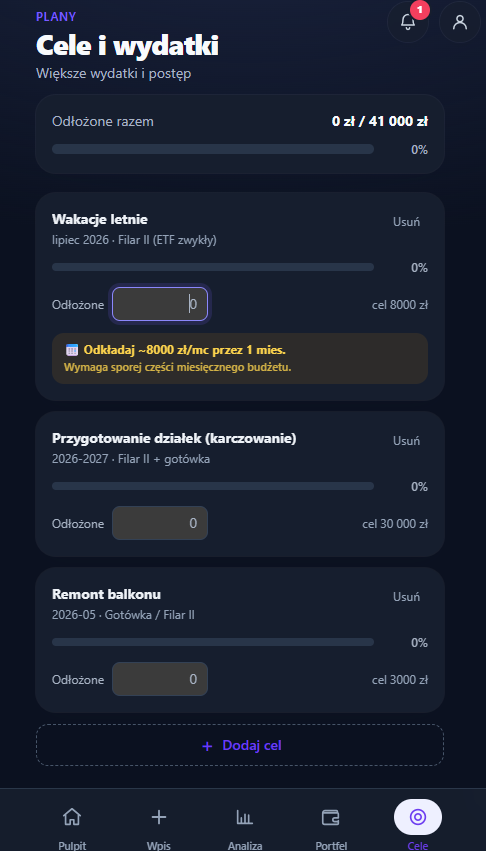
A long-term direction and the concrete expenses along the way. The screen has two parts that deliberately work differently:
- The main goal is the direction for your whole wealth (debt-free, a million in liquid assets, financial independence). Its progress is calculated automatically from the Portfolio.
- Spending goals are concrete amounts with a date: a summer holiday, a home deposit, a child's tuition. Each has its own "Saved".
The order on screen is fixed: first the answer to whether the goals fit what you put aside (full width), below it a compact main goal row (name, progress bar, when at the current pace), and then the list of goals. On a desktop the list is a table — Goal | Deadline | Saved / amount | Monthly | Actions — so goals can be compared at a glance; the "Saved" fields line up in one column and "Edit" always sits in the same spot of the row. On a phone the same information sits on cards, and the main goal row sits below the list of goals — so you don't have to scroll past it to reach "Add goal". Both views use the same order: goals past their deadline first, then by deadline, goals without a deadline last.
The Add goal button sits next to the list heading and the form opens above the list — on a phone you don't have to scroll past every card. After adding, focus moves to the new goal's card and a screen reader hears "Added “…”".
- A goal shows facts: progress, the amount and how much to set aside each month until the deadline — e.g. "~1000 zł/mo · 16 years" (beyond two years the time is in years, not "195 mo"). Whether it all fits is judged in one place — the answer at the top.
- Estimated amounts ("about", "~") are rounded so they don't pretend to a precision the estimate doesn't have: to 10 zł below 1000 zł, to 50 zł up to 10,000 zł and to 100 zł above ("~1000 zł/mo", not "~1022 zł/mo"). The percentage on a goal's bar is a whole number, rounded down — 99.6% isn't "100%" yet.
- Saved is typed straight into the list, in a regular amount field with "zł". It's formatted ("120,000") and stored when you leave the field (or press Enter). The save is confirmed by one message at the bottom of the screen, with Undo (see below) — there's no second "✓ Saved" next to the field any more. An invalid amount isn't stored: the field goes back to the last saved value and a message stays below it, in the error colour (not the red used for a value going down), e.g. "That’s not an amount — keeping 5000 zł.". In the table the message gets its own full-width row below the goal (it no longer wraps inside the narrow amount column). Escape in the field restores the stored amount — leaving the field then saves nothing.
- The goals table (computer) has fixed column widths: it doesn't jump when a couple's trail appears under a goal's name or a completed goal leaves the list. The goal name takes the remaining space and wraps when needed. In the Actions column "Edit" always sits at the top right; next to it, on the same line, "Mark as completed" (for a goal past its deadline or with the amount collected), and below them — across the full column width — "Move…" / "Change deadline". A row past its deadline therefore has two lines of actions, not three, and isn't twice as tall as the others.
- When you enter the field (with Tab or a click) the whole amount is selected, so the number you type replaces it instead of being appended to the old one. An amount more than 10 times the goal amount is almost certainly a typo: it isn't stored, and the message says so ("150,000,150,000 zł is more than 10 times the goal amount — keeping 120,000 zł."). Every change to "Saved" can be undone: "Saved towards “House build”: 150,000 zł · Undo" appears at the bottom. This message doesn't take focus away from the form — keyboard users can carry on — and that's why it doesn't disappear on its own: it stays until your next action, and you can also undo with Ctrl+Z (⌘Z on a Mac) when the cursor isn't in a text field (see "The "Undo" message" below). With an absurd ratio the progress bar shows ">999%" instead of a many-digit percentage.
- Below the amount you can see how current it is: "As of: 30 Sep", and in a couple's plan who changed it: "Updated: Ania · 2 Oct". Every "who and when" date on the screen uses one format: the day and a short month, with the year only when it isn't the current year ("30 Dec 2025").
- In a couple's plan the last decision about a goal shows under its name: who moved the deadline and when ("Moved: Ania · 2 Oct") or changed the goal in the edit form ("Changed: Kuba · 2 Oct"). In the table the trail sits in the goal column, not in the deadline column next to the time left. The person is the device owner — the role chosen in Settings (main person or partner). When the device doesn't know who is using it (no role chosen), the trail is saved without a person and shown that way ("Moved · 2 Oct") — the app doesn't sign the decision with the main person's name "just in case". The same goes for "Saved", removing a goal and the savings amount. The trail is saved with the goal, so in a cloud plan the other person sees it too; it's encrypted like the rest of your data (E2E). Older goals simply don't have it.
- Edit sits next to the goal, Remove lives inside the edit form (so it isn't hit by accident). Removing can be undone: "Removed “…” · Undo" appears at the bottom (in a couple's plan with a name, when the device knows the person: "Removed “Renovation” · Ania").
- When saved ≥ amount, the goal gets a "Fully funded" check-mark badge in the app's colour — not green, which in GrapeVest only ever means a value went up. It's a fact about the money, not the end of the goal: a goal ends only with Mark as completed. The screen uses one word for a finished goal — "completed" (button, message, archive).
Goal past its deadline
When the deadline has passed and money is still missing, the goal says so calmly ("Deadline passed — 3000 zł missing") and offers two actions — in this order, because a goal in the past (e.g. an August holiday) has usually already happened:
- Mark as completed — moves the goal to the archive (see below).
- Move “{goal}” to {month} · ~X/mo — a concrete new deadline, calculated the same way as the verdict at the top: the missing amount spread over enough months to fit what's left of your monthly savings after the other goals. One click, with Undo. The proposal reaches at most 12 months ahead — this year's holiday doesn't end up in 2029. When nothing is left over, or it would be more than a year away, this spot shows Change deadline instead. It opens the edit form with the cursor already on the deadline field. The field doesn't offer a date in the past: when something is left over, it starts at the month calculated as above (without the one-year limit — the decision is yours), and when nothing is left, it's empty. The hint under the goal uses the same word as the button: "move the deadline" next to "Move…", "change the deadline" next to "Change deadline".
The "Undo" message
After removing, completing or moving a goal, a message with Undo appears at the bottom of the screen. It disappears after 8 seconds, but:
- the countdown pauses while the mouse is over the message or keyboard focus is on "Undo" — keyboard and screen-reader users get the time they need,
- Escape closes it right away,
- when it disappears, focus moves to the next goal in the list (or the list heading) instead of jumping to the top of the page,
- the buttons next to each goal include the goal's name in their accessible name ("Mark as completed: Holiday"), so a screen reader knows which goal they act on. The move button shows the goal's name on screen — "Move “House build” to February 2029 · ~6450 zł/mo" — and its accessible name is exactly that visible text (someone using voice control says what they see),
- there's one message on screen at a time: a new one (e.g. after changing the main goal) replaces the previous one instead of stacking on top of it,
- on a phone the message sits above the bottom navigation, on a computer in the bottom-right corner of the window (not over the middle of the table); the list gets extra room at the bottom meanwhile, so the last goal isn't hidden under the message. If the message would still cover the row that changed, it moves to the top of the screen. The changed row (after saving "Saved" or moving a deadline) is briefly highlighted, so you can see what the message refers to,
- a message that did not get focus — after saving "Saved" in place and after moving a deadline from the form preview (the cursor stays in the form) — doesn't disappear after 8 seconds. A keyboard user couldn't reach it in that time (WCAG 2.2.1). It stays until your next action: a click outside it, another message or leaving the screen. It also announces a shortcut: Ctrl+Z (⌘Z on a Mac) undoes the change when the cursor isn't in a text field — inside a field the shortcut undoes your typing, as usual in the browser.
Goal source and "Saved" from the Portfolio
In simple mode the source field is tucked under More options in the goal form (a goal that already has a source shows it right away); in full mode it's always visible.
"Source (optional)" is a list: Portfolio holdings and other assets (e.g. "Cash"). You can also pick "Other (describe)" and type the source in words — that is how goals added earlier, when the source was plain text, are shown.
Once a holding is picked, the option "Count “Saved” from this source's value" appears — for when the whole account is earmarked for the goal. "Saved" then doesn't need retyping every month: the goal shows the source's value ("from “Cash” · live from the Portfolio"). If several goals use one source, they share it in turn — nearest deadline first, each up to its own amount — so the same money never counts twice.
Unlinking the source (or turning off counting from it) doesn't reset "Saved": the last value calculated from the source stays, and the form says so ("“Saved” stays at 20,000 zł — the last value from the source. From now on you update it by hand.").
When a goal's source also counts towards the main goal (e.g. cash with "a million in liquid assets"), the goal says so: "This money also counts towards the main goal". It's the same money seen from two sides, not extra wealth. This also covers older goals whose source was typed as text, as long as a Portfolio holding can be recognised in it (e.g. "ETF investments + cash" → "Cash"). If it can't be matched, a general note appears: "If this money sits in your Portfolio, it also counts towards the main goal".
Completed goals
Mark as completed doesn't touch "Saved" — the goal gets a flag and a date, leaves the plan and the totals, and moves to the collapsed "Completed (N)" section at the bottom. The section header sums up how much you saved for those goals ("13,000 zł saved together"). Right after clicking it can be undone, and later restored with Restore in that section. In a couple's plan the archive also says who completed the goal: "Completed 2 Oct · Kuba". A fully funded goal (saved ≥ amount) also offers "Mark as completed". When every goal in progress is fully funded, the answer at the top says so with the same large heading as the other verdicts — "All set — 308,000 zł for 2 goals", with the amount for the next goal below — and offers a single Mark all as completed button (with Undo for the whole group; the message reads "2 goals moved to completed"). With one goal it's a regular "Mark as completed" button, and the message names the goal ("“TV” moved to completed"). Calmly: a check mark in the app's colour, no confetti and no green.
The amount for the next goal says where it comes from, just like the verdict. "Free" appears only for an amount you entered yourself ("5000 zł/mo free for the next goal"). When the basis is the monthly plan's contributions to accounts, it's a plan, not free money: "from your contribution plan: 6800 zł/mo — for the next goal" (that money is already assigned to accounts). With the default estimate: "roughly X/mo (estimate) — for the next goal".
When a fully funded goal sits next to goals without a deadline only, the answer no longer says "No goal has a deadline yet" (the funded one has one). The heading is about the funded goals — "“Holiday”: amount collected" (with several: "2 goals: amount collected") — and the sentence below says what the undated goals are missing: "“Car” has no deadline — add one to work out the monthly amount." (with several: "2 goals have no deadline — add deadlines…"). It used to say "goals without a deadline aren't in the total", although in this state there's no total on the screen at all. The action is for the funded goals only: Mark as completed or Mark collected goals as completed. The undated goal stays on the list.
Once all goals are completed, the screen doesn't go back to the first-run instructions. It shows a calm summary — "Completed: 7000 zł across 2 goals", with the amount for the next goal below, with the same source ("from your contribution plan: 6800 zł/mo — add your next goal", or with an amount you entered "5000 zł/mo free — add your next goal") — and an Add goal button.
With no goals yet, the screen explains what they're for (an amount and a date → how much to set aside each month and whether everything fits) and offers one main Add goal button; choosing the main goal is a secondary button then.
Do the goals fit together
Each goal can look realistic on its own while all of them together don't. So the top of the screen answers that question instead of just summing up savings. The heading is the verdict; the numbers behind it are a sentence below:
About 15,700 zł/mo short — until June 2027, mainly because of “House build” Your goals need 22,500 zł/mo in total, and your portfolio contribution plan is 6800 zł/mo.
or
It fits — about 1650 zł/mo left over
and when some goals are past their deadline — in the same heading:
It fits — about 570 zł/mo left over · “Holiday” is past its deadline: 3000 zł missing
-
Your goals need … in total — the sum of the monthly amounts of all goals with a deadline (for each: the missing amount ÷ months left until the deadline). With a single dated goal, without "in total": "The goal needs 1000 zł/mo, …".
-
How much you put aside — the basis of the check and where it comes from, named plainly:
- the amount you entered with Change amount — "you put aside X/mo" (without "about" — it's the number you typed, not an estimate),
- the savings range from the monthly entry — its upper end counts, and below it you see "Upper end of the range from the monthly entry (6000 zł to 9000 zł/mo)". When the goals need more than the lower end, the verdict says "Fits only at the upper end — about X/mo left over" rather than simply "it fits",
- otherwise the sum of the monthly contribution plan in your portfolio: "your portfolio contribution plan is 6800 zł/mo". It's a plan, not a fact, so we don't say "you put aside". The app used to add 20% to the plan and show the result as "you put aside about 9100 zł/mo" — it no longer does. Money set aside for someone else (positions with a beneficiary, e.g. a child's 800+ bonds) is not part of the plan for goals — the same as in "For freedom" and FIRE. In the sample data the contribution plan is 7600 zł/mo, but 800 zł of it is Zosia's 800+, so 6800 zł/mo counts for goals (Goals used to count the child's money as yours — the gap came out at about 14,900 instead of 15,700 zł/mo). The scenarios in the monthly entry still spread the amount over all positions, the child's too,
- with no data at all — a default estimate with a request for your own amount. That isn't a fact either: "Your goals need X/mo in total, and the estimated amount for goals is about Y/mo.". When the goals don't fit with such an estimate, the amber action is Enter your amount (it opens the amount panel) with the sentence "The gap is based on an estimate of 4000 zł/mo, not on your own amount." — moving a goal according to a made-up number isn't the first step. The deadline move stays below as a second, quieter option. Saving the same amount (4000 zł) in the panel counts too — from then on it's your amount, not an estimate.
So "you put aside" appears only with an amount you entered yourself — the same in the answer, in the form preview and in the amount for the next goal.
Change amount lets you enter your own; the same amount drives the check of individual goals (the scenarios in the monthly entry use the range). In the panel the cursor is already in the field with the amount selected — typing a number replaces it. Save without changing the amount saves nothing: the contribution plan doesn't turn into an "entered amount", and no "Changed: …" appears in a couple's plan. A change can be undone ("Amount for goals: 9000 zł/mo · Undo"). When an amount is entered and the portfolio has a contribution plan, the panel also offers Use the contribution plan: 6800 zł/mo (also clears the Entry range) — it removes the entered amount and the check goes back to the plan (also with Undo). The label says so plainly, because the entered amount is also the upper end of the scenario range in the monthly entry: after going back to the plan the entry uses the default range (60–120% of the plan). It's shared, so in a couple's plan you can see who set it and when ("Changed: Ania · 15 Oct"). The amount, its source and Change amount sit in the summary column next to the verdict (on a phone — below it), under the "Saved for active goals" bar, so the verdict stays short.
-
One verdict. "It fits — about X/mo left over" or "About X/mo short". When short, the verdict also says until when and why: the horizon is the deadline after which the remaining goals fit into your savings, the cause is the goal with the largest monthly amount (on a tie, the one with the nearer deadline). With only one dated goal, without "mainly": "— until April 2027, because of “Renovation”". Below the heading — a concrete action: the app looks for the smallest move of one goal's deadline that closes the gap. Move “House build” to February 2029 · ~6450 zł/mo applies it right away (with Undo), and the sentence next to it gives the effect: "That leaves about 370 zł/mo." (instead of repeating what the button says). It's the same button as on a goal past its deadline. Only a move after which the plan really fits is offered. The proposed deadline leaves a buffer — at least 5% of your monthly savings stays free, so the plan doesn't close "to the złoty" (about 100 zł) and fall apart in the first weaker month. When no buffer is possible, the proposal is calculated without it. When a single move isn't enough, the verdict says a lower amount or more monthly savings will help. When an open goal form (adding or editing) proposes its own move — calculated together with the goal in the form — the verdict doesn't show a second, competing proposal; it only says that the form below now suggests the move. Falling short is shown calmly, not as a red alarm — and it's the only amber spot on the screen. When the verdict changes (e.g. after moving a deadline or changing the amount), screen readers announce it.
-
Goals past their deadline aren't part of the monthly total, but the answer always mentions them. When short — on a separate, neutral line below the verdict ("Plus 3000 zł still missing in goals past their deadline."). When the plan fits (e.g. right after the move that closed it) — in the verdict itself, so "It fits" doesn't skip goals that still need attention ("It fits — about 570 zł/mo left over · “Holiday” is past its deadline: 3000 zł missing"; with several: "goals past their deadline: … missing in total"). Goals without a deadline aren't included either, since they can't be spread over months.
-
In a couple's plan, when the other person recently (within 14 days) moved the deadline of a shared goal, the answer says so in one sentence: "Kuba · 2 Oct: new deadline for “House build” — June 2027". It comes from the goal's decision trail (the same one shown next to the goal), appears only on the other person's device and only when the device knows its role. The app doesn't remember your "last visit" — the 14-day window approximates it. The sentence comes before the proposed move — first the partner's decision, then the action. When the proposal concerns that very goal, the button is a question to talk over, not an order: "Talk it over: move “House build” to February 2029? · ~6450 zł/mo".
-
When all goals are past their deadline there's no monthly total — the answer says what's missing and what to do: "“Holiday” is past its deadline — 3000 zł still missing. If it has already happened, mark it as completed; if not, move the deadline." (with several goals: "Your goals are past their deadline — X still missing in total"). The hint uses the same word as the button next to the goal: "move the deadline" with "Move…", "change the deadline" when a goal only has "Change deadline". In this state there's no monthly amount and no "Change amount" — they change nothing for goals past their deadline.
-
Next to it, in smaller type: "Saved for active goals: X of Y" with a progress bar. It's the sum over goals in progress (completed goals excluded). "Goal progress" in the health score in Analysis is computed the same way — saved ÷ amounts of goals in progress — so the two numbers match.
Goal form
- While adding and editing — a two-line preview. The first line: the goal's plan and the total for the whole plan — "Set aside ~X/mo for 3 years · After adding: about 23,300 zł/mo in total" (when editing: "After this change: …"; with no other goals, no "in total"). The second: the effect and the rating — "About 15,700 zł/mo short. Together with your other goals that’s more than your portfolio contribution plan (~6800 zł/mo)…". The rating names the source of the amount the same way as the answer: "you put aside" only for an amount you entered, "your portfolio contribution plan" for the plan and "the estimated amount for goals" for the default estimate. The feasibility rating is about what's left of your monthly savings after the other goals in progress — not the whole amount. So a small goal isn't "realistic" when the other goals already exceed your budget. The goal being edited isn't counted twice.
- When the shortfall is already in your other goals and the new goal fits into your savings on its own, the preview doesn't tell it to take longer or cost less — it says where the problem is: "This goal alone needs ~210 zł/mo — the shortfall (about 15,700 zł/mo) is already in your other goals." — and right below, inside the preview, there's the button for moving another goal (with that goal's name, because inside a form you couldn't otherwise tell whose deadline changes), so there's no need to scroll back to the top. The move is calculated together with the new goal — e.g. "Move “House build” to August 2029 · …", not February 2029 as in the verdict without the new goal — and offered only when it really closes the gap (also when the gap only appears because of the new goal). So after "Add goal" the answer says "It fits", not "About 630 zł/mo short". The button never moves the new goal — you choose its deadline in the form. After the click the cursor stays in the form, on Add goal (or Save); the "Moved … · Undo" message doesn't take it away and the page doesn't jump. The "later deadline, lower amount" advice stays for a goal that exceeds your monthly savings by itself.
- On save the app shows all errors at once, each under its own field (red border and a message such as "Name is required", "Choose a deadline", "Amount must be greater than zero"), and the cursor moves to the first invalid field. Fixing a field clears its message right away.
- The deadline field uses the app's built-in month picker. The deadline is required — without it there's no monthly amount. A hint under the field says so and stays visible next to an error message.
- On a phone Deadline and Amount sit one under the other (side by side on wider screens); the empty deadline field just says "Month".
- The amount accepts only digits and separators — letters can't be typed. When you leave the field, the digits are grouped ("19 500").
- The "Tuition: child's name" suggestion appears in the add form when the family has a child with a birth date and no such goal yet. It fills in the name and the deadline (19th birthday) and puts the cursor straight into the amount field, with a hint on how to estimate it. A name you've already typed isn't overwritten — then it only sets the deadline.
Main goal
- The main goal row shows the name, a progress bar and — when it can be calculated — when the goal will be reached at the current pace.
- Change goal opens a sheet with goal types — a radio group (one choice, arrow keys work), with the current type selected. A custom goal needs a name and an amount above zero (placeholder "e.g. 500,000"); until then "Save" is disabled and the reason is shown below it: "Enter a name for the goal" or "Enter the goal amount".
- Changing the main goal can be undone — after saving, "Main goal: … · Undo" appears at the bottom, as when moving or removing a goal. Saving without any change (same type, amount and name) simply closes the sheet, with no message.
- The main goal's progress is shown in whole percent (rounded down below 100%) — the same way as on the Dashboard and in the loan details (e.g. "19%", not "19.9%").
- The Debt-free goal shows when the debts will be gone at the current pace: "Debt-free around 2051 at the current pace". It's the same year as on the Dashboard, in Analysis and in FIRE — one schedule: instalment + average overpayment over the last 12 entries. When Portfolio has a planned overpayment higher than the actual one, an explicit what-if stands next to it: "With the planned overpayment of 4000 zł/mo it would be around 2034". When the year from the instalment falls after the end of the contract, the card states both dates ("The contract ends in 2049; at the entered instalment it takes until 2053 — check the instalment"). Details in Calculations.
Main goal: financial independence
In full mode (FIRE module on) the main goal can be financial independence. When you pick it, the app shows where the amount comes from:
- FIRE number from Analysis — annual expenses ÷ safe withdrawal rate (minus fixed post-FIRE income, if you entered any), plus the loan balance still to repay in the FIRE year. The formula under the number shows that term when it isn't zero ("… ÷ withdrawal rate 3.5% + loan balance in the FIRE year 412,000 zł."), so the number and the formula agree. In the sheet it's rounded to thousands ("about 1,531,000 zł") — it's an estimate, and złoty-level digits would suggest a precision it doesn't have; the goal itself uses the exact number. It's the same number and the same settings as in Analysis → FIRE. The "FIRE settings in Analysis" link goes straight to the FIRE assumptions on the "Future" tab. Your choice in the sheet is remembered while you visit Analysis — back on Goals (within a quarter of an hour) the sheet reopens with it. On a later visit it no longer opens by itself.
- An empty amount field means the goal follows the FIRE number and changes with your expenses. You can also enter your own amount — the goal row then shows the FIRE number next to it for comparison, and "Use the FIRE number" switches back.
- While annual expenses are unknown there's no FIRE number, so your own amount is needed.
- The goal row shows when at the current pace: "Independent around 2041 at the current saving pace" — from monthly contributions to the investment portfolio and the real return in the FIRE settings (the same calculation as in Analysis).
- Progress is measured against the investment portfolio, just like "% FIRE" in Analysis (details in Calculations).
In simple mode (FIRE hidden) financial independence can't be picked as a new goal. If it already is the main goal (e.g. after switching from full mode), it keeps working, but without pointing to the hidden FIRE analysis: the row says "Amount = annual expenses ÷ withdrawal rate", the sheet keeps that type selected, and instead of the link it explains that the withdrawal rate and other income can be set once the FIRE module is turned on in Settings.