Profile & settings (⚙️)
Reached via the profile icon in the top-right corner.
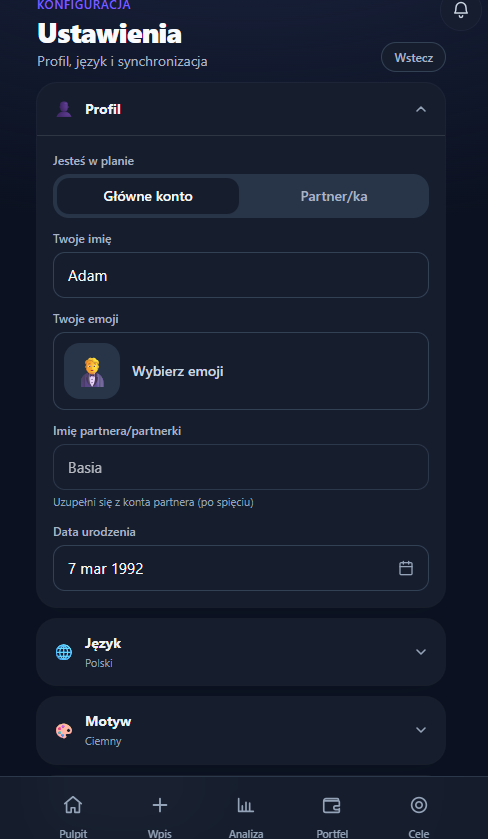
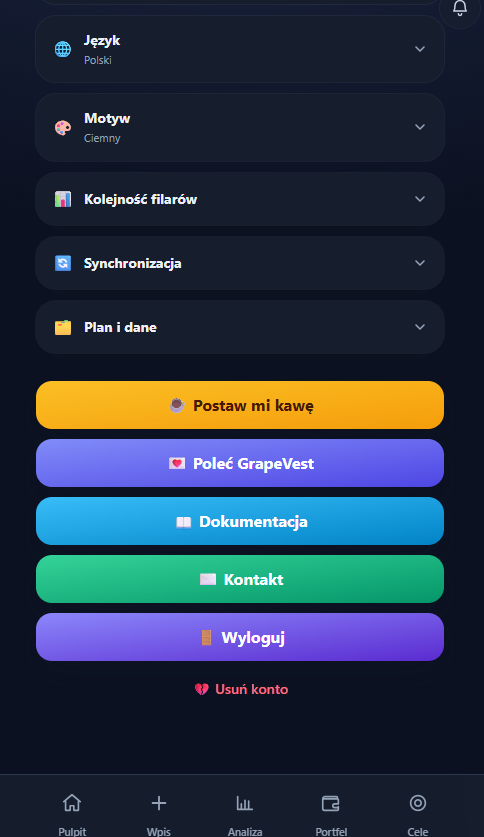
Screen layout
At the top is the Our plan card (My plan for one person). It says in one place whose plan it is and where the data lives:
- the adults' names (or the plan name, if you set one), labelled children and country — e.g. "Kuba & Ania · Children: Zosia · Poland",
- without an account: "Plan saved on this device" — nothing leaves the phone or computer (data in the browser isn't encrypted — E2E encryption applies to the cloud account),
- with an account: "Plan encrypted on your devices (E2E)" and where the recovery code is — we showed it once, when the account was created; it's wherever you saved it (printout, password manager),
- shortcuts to Profile & family, Investing country and Account & sync (without an account — Backup).
Below the card, sections are collapsed and arranged in groups. Each group is one card and its sections are rows — the screen is shorter and it's clear what belongs together. On a phone, a Jump to… list with a Go button sits above the groups: pick a section, and only the button (or Enter) opens it and scrolls to it. Browsing the list with the arrow keys opens nothing (on a computer the outline on the left does this). Under each group name one sentence states its scope — whether your partner sees the change or it stays on this device:
- Household — "Shared by both of you — changes show on both devices" (without an account: "Shared by both of you — one family plan"; for one person: "Saved in the plan — the person you invite will see it too"): Profile & family, How we count shared wealth, Investing country, Asset categories and App view. The layout is the same in the Simple and Full views — it doesn't depend on Portfolio modules,
- Couple (only in a couple's plan) — "Who changed what in the whole plan, and when — you both see it.": one section, Recent plan changes,
- This device — "This device only — your partner sets their own." (one sentence for the whole group): first Who uses this device (when the plan has two adults), then Language and Theme,
- Account & data — without an account: "The whole plan — backup and import cover all data"; with an account: "Your account and the encrypted plan — backup and import cover the whole plan". Sections: Account & sync, Broker import, Backup,
- Irreversible changes — separate, with extra space: the Plan & account section. The zone has the same name in the contents list and in every message that points to it.
Below them is the Help and contact card. A collapsed section shows its current state under the name, so you don't have to open it — e.g. "Kuba · b. 1992 · 1 child" (or "no birth date"), "6 categories", "Simple — just the basics", "No account". Section icons are the same line icons as in the navigation; screen readers skip them.
Changes save instantly — there is no "Save" button on this screen. Text fields (names, the plan name) save when you leave the field; a quiet "Saved" then shows briefly next to the label. A name can't be left empty — an empty value isn't saved and "The name can't be empty" appears under the field.
On desktop there is a section list on the left. Clicking an item scrolls to the section, opens it and moves keyboard focus to it; the section nearest the top edge of the screen — the one you're reading — is highlighted (at the very top of the page — none). The "Back" button is shown only on the phone — it goes back to the previous screen (or to the Dashboard if there is none); on desktop the side navigation does that job.
Links to sections
Every section has an address that opens it, e.g. /settings#settings-profile
(Profile & family), #settings-joint (How we count shared wealth),
#settings-country, #settings-categories, #settings-view,
#settings-device (Who uses this device), #settings-language,
#settings-theme, #settings-sync, #settings-import, #settings-backup,
#settings-changes (Recent plan changes, in a couple's plan),
#settings-reset (irreversible changes) and #settings-help. Adding
?focus=birthDate (/settings?focus=birthDate#settings-profile) expands the row
of the person marked "You", scrolls the birth date field to the middle of the
screen and focuses it; with &member=<person id> — the same for a specific person
(e.g. ?focus=birthDate&member=m-partner). The app waits a few frames for the
field while the section and the row open, so focus doesn't fall back to the
section heading. That's how screens
that need it (e.g. FIRE) link here. The partner invite sheet links to
#settings-sync, and the "remove the partner and invite again" message links to
the irreversible-changes zone. Links work even when Settings is already open
(changing the anchor in the address opens that section) — also after tapping a
notification in the bell: the section opens and keyboard focus lands on its
heading. When the section doesn't
exist in this plan — e.g. #settings-device in a one-person plan — Profile &
family opens instead.
For screen readers: section names are headings (groups — level 2, sections — level 3), and segmented switches (role, country, language, theme, view preset) are named button groups.
Profile & family
This section is only about people. Who uses the device lives in the "This device" group, and the rules for shared wealth have their own section (below).
- People in the plan — a compact row per adult: emoji, name, a You badge on
the person using this device and one status line ("b. 1992", "no birth date",
"JDG"). Clicking the row expands it for editing:
- name — yours is always editable; the other person's is editable here without an account, and with a cloud account it comes from their account (read-only),
- emoji — the button states the current emoji (e.g. "Pick an emoji, currently 🧔"),
- date of birth — separate for each person (FIRE / Coast FIRE uses the age of the person concerned),
- Self-employed (sole trader) — a switch shown when the country is Poland, always in the person's row (in every view). When on, it raises that person's annual IKZE contribution limit to the self-employed limit (the limit usage bar in Portfolio). The JDG flag on a single holding still works and takes precedence for that holding,
- Children & dependents — a list of the people you save for (children, grandchildren, heirs). For each you set a name, emoji and an optional birth date. "Remove" next to a person asks for confirmation first — the person is removed only after "Yes, remove". The button isn't red: you can always add the person again.
With a cloud account, until you choose who you are on this device nobody is marked "You", and the top of the section links to the "Who are you in this plan?" question.
How we count shared wealth
A fixed section in the "Household" group, in both the Simple and Full views — for a couple the 50/50 split is an important decision, so we don't hide it. For one person it's called "What the plan is called".
- Shared wealth in a person's view (when the plan has two adults) — how to count holdings with no owner (home, land, a joint loan) for a single person: Full amount to each (100% — the default) or Split in half (50/50). With the 50/50 split, your wealth and your partner's add up to the household total. This is only a way of presenting things — it doesn't change any data or the Family total,
- Plan name — a custom label under the dashboard title (e.g. "The Adams' portfolio") instead of names; leave empty to use names.
Both settings are shared by the plan. After a change the section says who will be told — e.g. "Ania will get a notification about this change." (see Plan changes reach the other person).
Who uses this device
The first section in the "This device" group, shown when the plan has two adults:
- without an account — the Who is using this device now? switch with names, e.g. "Kuba / Ania". It decides whose name is "yours" and who records contributions,
- with a cloud account — first a one-time Who are you in this plan? question. After that the section shows "On this account you are Ania in the plan" and a Change button. Changing asks for confirmation ("Yes, change") and brings the question back — a mistake can be fixed, and plan data doesn't change.
Switching the person retires the previous person's Undo — the message at the bottom of the screen and the "Changed from Poland · Undo" and "Category “Crypto” deleted · Undo" lines disappear. On a shared laptop Ania can't silently undo a country change or a category deletion made by Kuba (undoing also removes the log entry, so nobody would hear about it). The changes themselves stay.
The plan's model is two managing accounts (you + your partner — the second one added via invite) plus any number of dependents who are beneficiaries ("for whose goal"), not managers of the wealth. The same children editor appears as an optional step in the starter wizard.
People are the shared source of truth: they show up in the people switcher on the Dashboard and as owners/beneficiaries of holdings in the Portfolio.
Run the setup again
At the end of the section there's Run the setup again — for when you want to set up again who is in the plan (you, your partner, children) or switch between couple and solo. It's reversible, so it isn't red and doesn't ask for confirmation:
- the wizard has its own wording: the first step is Change who is in the plan and the current choice is marked (e.g. "Now: Kuba and Ania"); no "Best experience" badge,
- the wizard opens with your current names; nothing is written to the plan until you finish — the "Just me" path doesn't remove your partner halfway, and children added or removed in the wizard are a draft until the last step (removing also asks for confirmation),
- the partner invite step is skipped when the partner is already in the plan or when you run the plan without an account (there's no invite code there),
- I already invest with a broker finishes the wizard only when the import actually created positions. Closing the import without importing (or "Undo import") returns to the wizard's last step, saves nothing and restores the plan's country from before the import,
- every step has Back to my current plan — it restores exactly what was there (including children added along the way) and closes the wizard,
- the only main action of the last step is Keep my current portfolio and finish — only the people and the country (if you picked another) change; positions, goals and history stay. The starting plans are folded under Start over (replaces your data): once expanded you pick a start, can save a backup first, and data is replaced only by Replace data (with a cloud account — after entering your password). There's no "Recommended" badge,
- Just me asks first when the plan has a partner: "Ania will no longer be a person in the plan once you finish the wizard". If the partner has their own account in this plan (cloud), the wizard won't do it — it explains that the plan stays shared and that detaching the partner is in the irreversible-changes zone,
- Back to my current plan returns to Settings with Profile & family open,
- the "wizard in progress" flag is stored only on this device — your partner in a Duo plan notices nothing until you finish.
App view
GrapeVest has basics that are always visible: net worth, the monthly entry, accounts and products, and goals. You turn the rest on in this section when you need it — so day to day the app only shows what you actually use.
At the top there are two presets: Simple (just the basics) and Full (all modules). Below them are switches for individual modules, grouped by the screen where each module shows up; any mix is a "custom set":
| Screen | Module | What it adds |
|---|---|---|
| Home | Income & spending | the monthly income and spending chart (on desktop) |
| Entry | Budget & scenarios | an amount to allocate and quick contribution scenarios |
| Entry | Month rating | rating your living costs in the last step of the entry |
| Insights | FIRE & simulations | the FIRE tab (future simulations, wealth timeline) and the "Financial independence" goal |
| Insights | Financial health & takeaways | the 0–100 score, the Takeaways tab and the "Health" tile on Home |
| Portfolio | Projection & maturities | the Projection tab and the income calendar for bonds and deposits |
| Portfolio | Split a contribution | target portfolio weights, the "Split a contribution" card and the drift hint after closing a month |
| Portfolio | Broker import | the import button in Portfolio and in the entry (in Settings, import is always there) |
| Portfolio | Investment details | tickers, account type, crypto transactions, annual return two ways (with your deposits — MWR — and the market alone — TWR) and the positions table on desktop |
After every change a short message appears under the group saying what changed and where — e.g. "Turned on “FIRE & simulations” — it shows in Insights." or "Turned off … — it disappears from Portfolio. Data stays." Next to it is Undo, which restores the previous set. Presets work the same way: clicking Simple or Full over a custom set can be undone, so a hand-picked set isn't lost with one click.
Turning a module off deletes nothing — it only hides screens and fields. Saved values (e.g. a month's budget, target weights) stay and come back when you turn it on again. The choice is part of the plan, so in a Duo plan you both see it.
What you see at the start: a new account starts with just the basics after the onboarding wizard (starting via broker import also turns on the import module). Plans created before modules existed see exactly what they saw before — the old Advanced mode maps to the Full preset. This section replaced the "Detail level" switch.
Preferences (per device)
- Language (PL / EN / DE — French will return once its translation is finished),
- Theme (system / light / dark),
- Asset categories (in the "Household" group; a plan setting, not a device one) — you define your own groups of holdings (e.g. Retirement, Investments, Crypto, Loan, Savings): add, rename, pick a colour from the palette and an emoji, set the order, delete (at least one always remains). Nobody forces a fixed set of pillars on you: you start from a ready-made set and tailor it to yourself. Details below, in Asset categories.
Asset categories
- Each row shows the name and the number of holdings in the category ("Crypto · 1 holding").
- Add category opens a name field (with the cursor already in it). The category is created only after Add or Enter — Cancel or Escape doesn't leave an empty "New category" behind.
- Names can't repeat (case doesn't matter). With a taken name the field says "A category with this name already exists." — Add is disabled and renaming an existing category isn't saved.
- The icon takes one character, including composed emoji (family 👨👩👧, flag 🇵🇱) — a new character replaces the previous one and nothing gets cut in half.
- Delete asks "Delete category “Crypto”?" and shows where its holdings go. The target follows what each holding is: Bitcoin without a "Crypto" category goes to "Investments", an ETF to "Investments", bonds to "Bonds", a loan to the debt category. Each group has a list to change the target ("Bitcoin → [Investments ▾]") — for assets the list leaves out debt categories ("Loan"), so they can't be moved there by mistake.
- The last debt category. When you delete the only debt category (e.g. "Loan") and it holds loans, the plain "Move and delete" is blocked — a loan can't land in "Retirement" or "Investments". The confirmation says so: "Mortgage · First move the loans to another debt category — the plan has none, so create a new one." and offers Create the “Liabilities” category and move. The new category gets the deleted one's colour and emoji, the loans move into it, and other holdings go where you pointed them. Undo restores the deleted category and removes "Liabilities" if nothing is left in it.
- Category rows are flat (a line between rows, no card inside a card). The Delete button in an expanded row is neutral, not red — the change can be undone.
- The confirmation is calm, without red, because deleting can be undone. Buttons: Cancel | Move and delete (an empty category: Cancel | Delete).
- After deleting, a message at the bottom of the screen says where the holdings went — shortened for longer lists, e.g. "Category “Crypto” deleted. Bitcoin and 4 others → Investments" — with Undo. The message stays when you collapse the section. Once it's gone, or when you leave Settings, the categories section keeps a "Category “Crypto” deleted · Undo" line — until you undo or close the browser tab (the snapshot lives in the tab's session memory, not in the plan). Undo puts the category back in its place and the holdings back into it.
- In a couple's plan, deleting a category reaches the other person's notifications, together with where the holdings went. An undone deletion disappears from the log — the other person isn't told about something that didn't happen.
Deleting a category doesn't change amounts or net worth — only the group a holding is shown in (Dashboard, Portfolio, Analysis).
Language and theme are a device setting — they aren't shared across the plan.
The light theme is white, with thin card outlines and a purple net-worth card. The dark theme is near-black, with cards outlined by a faint light edge and the net-worth card in deep purple. Both use the same typeface (Geist), so switching changes only the colours, not the layout.
The start page (for signed-out visitors) follows the same theme — on desktop it has its own sun/moon switch in the header.
Account & sync
Simple and clear — your data syncs automatically across all devices and household members (no manual refresh).
- Status — "Synced" plus the account email (the email also shows under the collapsed section's name; without an account — "Plan on this device only").
- Invite a partner — an invite code (copy it or send it by email). Your partner creates an account, chooses "I have an invite code" and enters it. This is a "couple" model (max 2 accounts): once your partner joins, the code disappears and you see "Partner connected"; if they detach ("Leave the shared plan"), the invite comes back.
- Set / change password — so you can sign in on another device (e.g. your phone). Buttons: Cancel | Save password. Errors are translated (e.g. "The new password must be different from the current one"), never the raw server text.
The account panel and the invite sit directly in the section (no cards inside the card), separated by a line.
Without an account the section doesn't stop at "no sync": it says you move the plan to another phone or computer with a file and links to the Backup section — the only place with the file buttons ("Save to file" and loading it). Before, the same file was offered here under a second name ("Download a copy of the plan"). That the plan lives only on this device is said once, on the "Our plan" card.
Detaching the partner, leaving the plan, joining another plan and deleting the account live in Irreversible changes.
Help and contact
At the bottom of Settings there's a single card with four rows:
- Documentation — opens this site in the language set in the app,
- Share feedback and Report a problem — the beta panel (below),
- Contact — email form (
contact@grapevest.pl).
Below the version number there's a small Buy me a coffee link.
Beta · Your feedback
GrapeVest is in beta, so we collect feedback from every user — not only the first group of testers. You can open the panel from three places: the Beta · Your feedback badge in the side menu (desktop), the end of the Dashboard (phone) and this section of Settings. Inside there are two separate paths:
- Share your opinion — a 1–5 rating, "what do you like" and "what could we improve". Optionally you can let us quote it on the GrapeVest site; the credit (name and country) then comes from your profile, with no extra fields.
- Report a problem — describe what happened and pick the severity with one tap: Blocks me, Annoying or Minor. Technical details are attached by default; before sending you can preview them ("Show what we attach") or untick them. Details: Privacy.
If sending fails (no connection or no cloud account), the panel does not pretend it worked: it offers a ready email with your text and the technical details, plus a retry button.
After you close a month, the Dashboard may show a short request for feedback — at most once every 30 days per device. "Not now" hides it for the same period.
Broker import
A dedicated section with an entry to the import wizard — always visible, also in the Simple view. It's the only permanent entry to import; the Import button in Portfolio module (App view) only adds a shortcut in Portfolio and in the entry — the section says so right under its button. The button is secondary, because importing isn't the main job of Settings. The wizard has the same capabilities as the card in Portfolio: upload an export from your broker (XTB, Trading 212, Interactive Brokers, DEGIRO, mBank and more) and GrapeVest recognizes the format and creates positions. The file is processed entirely on your device. Details: Broker import.
Backup
"Save to file" downloads your whole plan (holdings, assets, goals, monthly entries, profile) as a JSON file. "Load from file" restores it on this or another device with the same confirmation as the irreversible-changes zone:
- a Now → from file comparison for positions, assets, goals and entries (what goes away and what comes in),
- a Save a backup first link (a copy of the current plan before you replace it),
- in a shared (Duo) plan a warning that restoring replaces the plan for your partner too; with a cloud account — your password,
- Cancel | Restore buttons, and afterwards a quiet "Plan restored from the file" message.
The file is normalised just like cloud data (an older schema is migrated).
Irreversible changes
Every action that can't be undone lives in one section, Plan & account, and works the same way. Each has one sentence about its consequences under its name, visible before you click. The section sits in its own Irreversible changes group at the bottom of the screen, separated by extra space — the zone has one name everywhere: the group, the contents list and the messages that point to it. Its actions form one list of rows (with a cloud account, plan actions first, then account actions):
| Action | When shown | What happens |
|---|---|---|
| Clear plan | always | deletes positions, assets, entry history, goals and partner; an empty plan remains. With a cloud account — in the cloud too, and the account keeps working |
| Load sample plan | always | replaces all data with a sample plan (to explore the app with ready-made numbers) |
| Detach partner | account, partner joined | your partner loses access; the encryption key and invite code change |
| Leave shared plan | account | this account loses access; you can return only with a new invite code; data on this device is cleared |
| Join another plan | account | after entering an invite code, your current plan is no longer visible on this account (plans aren't merged) |
| Delete account | account | permanently deletes the account and access to the plan |
Clicking an action expands a confirmation below it — the name and description stay in place. Only one confirmation is open at a time: opening another action collapses the previous one. Confirm buttons have short labels that fit on one line on a phone: Erase, Load sample, Yes, detach, Yes, leave, Yes, join, Delete forever. The confirmation has a Save a backup first link that downloads the backup file right away (the same as "Save to file"). Buttons always come in the same order: Cancel | action. Only the confirming button is red; "Cancel" collapses the confirmation and returns focus to the action's name. On opening, focus goes to the first field (invite code or password).
With a cloud account every one of these actions requires your password (guards against accidents). A wrong password shows "That password doesn't match…"; no connection or a server error while checking the password gets its own message ("Couldn't check the password — no connection or the server isn't responding…"), so nobody changes a correct password. A failed operation shows a connection message (e.g. "Couldn't delete the account. Check the connection and try again.") in Polish, English or German — never the raw server error. In a shared (Duo) plan the "Clear plan" and "Load sample plan" confirmations say plainly that they change your partner's data too. After loading the sample you see "Sample plan loaded".
"Run the setup again" isn't in this section — it's reversible (see Profile & family).
Country & base currency
The Poland / Germany switch (with flags, names in the app language) has its own "Investing country" section (separate, not in the profile — because it drives currency, accounts and taxes). It's the one dimension the rest depends on — you can change it at any time (and it's chosen up front in the wizard).
The USA, United Kingdom and France markets have catalogues and rules in the
code, but work on them is paused, so they're not offered in the switch (or in the
wizard). A plan that already uses one of them still shows and keeps it. For testing
they can be enabled with NEXT_PUBLIC_SHOW_PAUSED_MARKETS=1 (USA and United
Kingdom).
The country changes the whole plan, so picking another country doesn't apply it straight away. A question opens under the switch — "Change country to Germany?" — with the consequences:
- the currency and the net worth in the new currency at the already known rate, e.g. "PLN → EUR · Net worth 721 343 zł → approx. €168,933 (rate NBP 4.27)" (the rate is fetched as soon as you pick the country; offline only the currency change is shown),
- one sentence about accounts, e.g. "You can switch 3 regular accounts to “Depot” later with one click; the rest stay unchanged." A Details link next to it expands the full breakdown: "3 regular accounts can then be switched in one click to “Depot” — the regular brokerage account there, no tax relief", "4 tax-advantaged accounts (IKE, IKZE, PPK) stay as they are" and "5 holdings outside a brokerage account (Child's 800+ bonds, EDO 10-year (series), Krugerrand 1 oz…) stay unchanged",
- a hint line: what the country changes and who will be told ("… Positions and history stay. Ania will get a notification about this change.").
Buttons: Cancel and Change (a solid violet button — the change is reversible; the gradient stays reserved for the net-worth card and a screen's main button). In Polish the question uses the accusative ("Zmienić kraj na Polskę?"). Only "Change" saves the country. After you pick a country the screen scrolls so the whole question, buttons included, is visible (also at 1440×900 and above the phone's bottom bar), and focus (and the screen reader) lands on its heading. "Cancel" returns focus to the selected country.
Going back to the starting country. If on the same day you return to the country from before the series of changes (e.g. Poland → Germany → Poland) and the account types are as they were, the plan is back where it started: the section says "Country: Poland — the plan is back to how it was before." (no Undo — there's nothing to undo), the "Changed from Poland" line disappears, and the whole series leaves the log — the other person doesn't get two notifications about a change that cancelled itself. If account types were switched to German ones in between, Undo stays and restores them.
After the change a message appears at the bottom of the screen — "Country: Germany · currency EUR." — with Undo (about 12 seconds; the timer pauses while the pointer is over it). It stays when you collapse the section. Once it's gone — or when you leave Settings, e.g. to check the amounts on the Dashboard — the country section keeps a "Changed from Poland · Undo" line (the collapsed section shows it too: "Germany · Changed from Poland"). The message and the line use the same word and never sit side by side — there's one "Undo" at a time. The line stays until you undo or close the browser tab (the snapshot lives in the tab's session memory, not in the plan — so only the author can undo; the other person gets a notification linking to this section). Undo brings back the state from before the whole series of changes: if you change the country, then the account types, and then undo, you get back both the country and the account types from before the first change. The message says exactly what came back — "Previous country restored." or "Previous country and account types restored." (only when account types really changed) — and screen readers announce it even when the section is collapsed. Undo removes the log entries of the whole series (country change, account-type change) and adds none of its own — the other person isn't notified about a change that in the end didn't happen.
What the country controls:
- Base currency — 🇵🇱 PLN, 🇩🇪/🇫🇷 EUR, 🇺🇸 USD, 🇬🇧 GBP. We show every amount in it. The plan stores amounts in PLN and the screen converts them at the base currency rate (the NBP average rate, or the ECB rate converted to PLN when NBP doesn't answer). At 4.27 PLN per euro, PLN 721,343 is about €168,933. Separators and abbreviations follow the app language, not the currency: in English "€168,933" and, compact, "€131k" or "€1.3M"; in Polish "168 933 €" and "131 tys. €"; in German "168.933 €" and "131 Tsd. €". Compact amounts (chips, list rows, the bar legend) are in whole euros with a "−" minus, like zlotys. Until a rate is known (first start without a connection) amounts stay in PLN and the country section says so — we never show zlotys with a euro sign. The rate is remembered, so a later offline start uses the last known one.
- Account catalogue — per country: 🇵🇱 IKE/IKZE/PPK/PPE; 🇩🇪 Depot/Riester/Rürup/bAV; 🇬🇧 ISA/LISA/Junior ISA/SIPP/GIA; 🇺🇸 401(k)/IRA (Roth & Traditional)/HSA/529/ brokerage; 🇫🇷 PEA/PER/assurance-vie/Livret A/CTO. Within a given country you won't see other countries' accounts. Account names aren't translated (they're legal terms).
- Contribution limits — per country and year (ISA £20,000, 401(k) $24,500, PEA €150,000…).
- Tax on withdrawal — the engine computes per country: PL Belka tax/IKZE; DE Abgeltungsteuer + Teilfreistellung + Sparerpauschbetrag (+ Kirchensteuer); UK CGT 18/24% above the £3,000 allowance (ISA/SIPP exempt) with a tax year starting 6 April; US LTCG 0/15/20% by holding period + Roth/Traditional (tax-free on the way out vs deductible on the way in); FR PFU 31.4% split into PS/IR plus the wrapper's age (PEA 5 years → 0% IR, assurance-vie 8 years). The projections don't pretend to Vorabpauschale/Vorab-level precision — that's flagged.
Changing the country doesn't touch existing data (PL works exactly as before). If you have positions with an account type from outside the new country (e.g. after switching PL → DE: a regular brokerage account or IKE), a calm summary with numbers appears under the switch — e.g. "11 positions have account types from another country — you can change 9 in one click." The list of positions is behind Show. When nothing is left to change in one click (e.g. after moving the ETFs to Depot), the box shrinks to one line — "8 positions keep account types from another country. Show" — with the list and the explanations behind "Show":
- ETFs, shares and funds in a regular account (PL regular, DE Depot, UK GIA, US brokerage, FR CTO) can be changed in one click to the country's equivalent — a neutral "Change account type to German (Depot)" button (for DE). Undo in the message restores both the previous country and the previous account types,
- crypto, metals and Polish retail savings bonds (EDO, COI, 800+) stay as they are even though their type is "Regular account" — they aren't held in a brokerage account, so Depot would be wrong for them. The summary says so in one sentence, and the numbers in the confirmation and on the button are exactly what will change,
- tax-advantaged accounts (IKE/IKZE/PPK, Riester, ISA, 401(k)…) stay as they are — they have no equivalent, so their limits and tax still follow the country of origin; the note stays until you change the type in the position editor.
Remapping changes only the account type (and so the limits and tax rules of those positions) — amounts, history and net worth stay the same.
Plan changes reach the other person
Some settings apply to the whole plan, not to one person. When, in a couple's plan, one person changes:
- the investing country,
- account types ("Change account type to German (Depot)"),
- the joint-assets split (Full to each / Half each) or the plan name,
- the family (a person added or removed),
- categories (a deleted category — with where its holdings went),
- the app view (Simple, Full or a custom set),
- a holding's monthly plan — e.g. the mortgage overpayment changed with "Change overpayment plan" on the Dashboard,
the other person gets a notification in the bell — e.g. "Kuba · country changed to Germany (currency EUR) · 3 Oct" or "Ania · shared-asset split: split 50/50" — with a link to the right Settings section (a monthly plan links to the plan card on the Dashboard — the screen scrolls to it and puts focus on it). Each change shows up once: after the panel is opened it's marked as seen on that device. The author isn't notified about their own change, and a one-person plan doesn't collect these entries at all. More: Notifications.
- A series of changes is one entry. Several changes to the same thing by the same person on the same day (e.g. an overpayment plan 4,000 → 4,500 → 4,800 zł, the country Poland → Germany → France, the shared-asset split, the plan name, or toggling view modules) make one entry from the first to the last value. Going back to the starting value ("there and back") removes the entry.
- A deleted category says how many holdings moved and where, with proper plural forms: "category “Crypto” deleted · 1 holding moved to “Investments”".
- An undone change notifies no one. "Undo" for the country, account types and categories removes that change's entries from the log.
The author follows the same rule as Who uses this device. In a plan without an account (one device), with no choice made it's the main person — exactly what Settings shows ("Who uses: Kuba", "Ania will get a notification about this change"). If you switch "Who uses" to Ania on a shared laptop, Ania sees Kuba's changes in the bell. With a cloud account, in a couple with no choice made, the author is unknown — the notification then has no name ("Country changed to Germany…").
Recent plan changes
In a couple's plan a separate Couple group (below Household) has a Recent plan changes section — a lasting list of the last ten changes to the whole plan: what changed, who and when (e.g. "Country changed to Germany (currency EUR)" · "Kuba · 3 Oct"). The collapsed section shows the latest change under its name. The bell only hints that something is new and disappears once seen; here you can see the history after the fact — your own changes and ones you've already seen too. The bell panel has an All plan changes link at the bottom that opens this section. The list doesn't calculate anything — it doesn't affect net worth or FIRE.
Euro plans from before the 2 October 2026 fix
Until 2 October 2026 a plan with Germany as the country stored the euros you typed as if they were zlotys (rate 1). After the fix those numbers are read as zlotys and divided by the euro rate, so such a plan shows about 4 times less wealth. We don't convert this silently — we can't tell which plans predate the fix.
A plan in a currency other than PLN without the new storage marker
(storageModel: "pln") sees a one-time "Amounts may have been saved in euros"
card at the top of Settings with two buttons:
- Convert ×4.27 — multiplies manually entered amounts by the current rate (manual position values, invested amounts, contributions and planned contributions, goals, monthly entries, net-worth snapshots, FIRE expenses and the main goal). It doesn't touch live-priced values (crypto, metals, Stooq ETFs, bonds, foreign-currency amounts — those are stored in PLN anyway), quantities, grams or interest rates. Results are rounded to the grosz. Afterwards the card says "Amounts converted ×4.27." with Undo, available until the browser tab is closed — undo divides by the same rate and restores exactly the previous amounts (and the card with the question),
- Leave as is — amounts stay, the plan gets the marker and the card doesn't come back.
Without a rate (offline) "Convert" is disabled and the card says you can convert once you're back online. New plans and every PLN plan get the marker straight away, so they never see this card. In a shared plan one person converts — the change syncs to the partner like any other; ideally the other person's app is in sync at that moment (no offline edits with the old amounts).
The interface is also available in German and French (via the language switcher).
App version
At the bottom of the Settings screen there's a version footer in the format
Version: 1.1.0 · 2026-07-05:
- 1.1.0 — the app version (semver
major.minor.patch, frompackage.json), - date — the day the release was built (the deploy date).
The commit hash (build) is no longer part of the text — it shows on hover and sits
in the data-build attribute; it's for confirming the device runs the latest
deploy rather than a stale offline cache.