Monthly entry (➕)
The monthly ritual of filling in your data — the heart of the app.
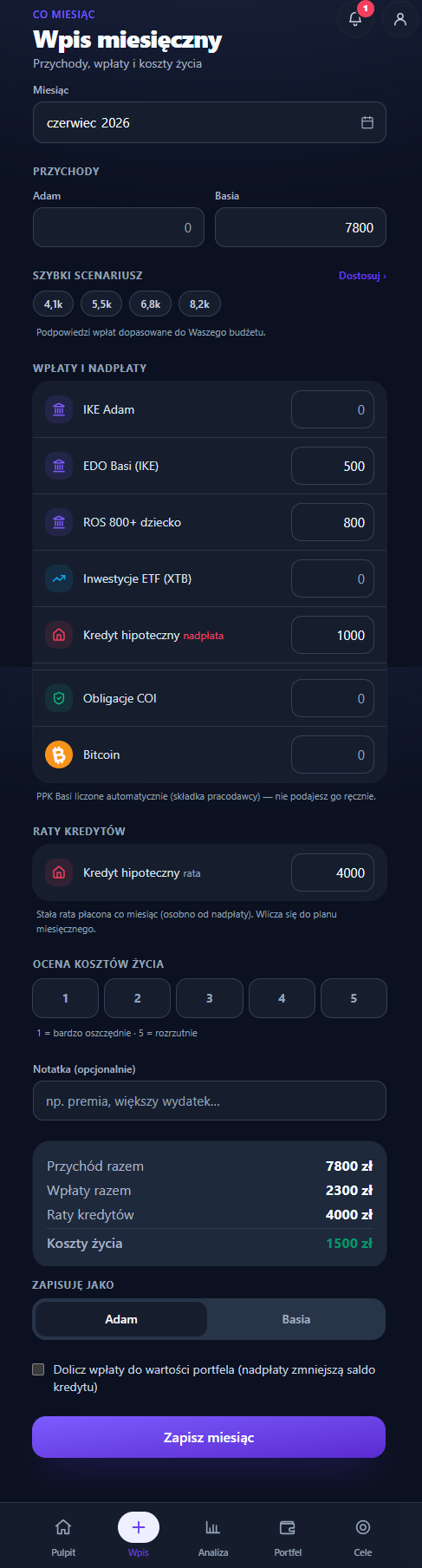
A 4-step wizard
Who has saved the month. When the chosen month already has an entry, the couple's status shows below the month field: each name with "saved ✓" or "not yet". When you've both saved — "October closed together — changes will update the saved entry." (the same "closed together" as the Dashboard banner; the desktop status bar says "October closed ✓"). When the entry has amounts but nobody is recorded as having saved it (an older save from a device with no person picked), you see "Month saved — to be confirmed" with a request to save it as yourself. In a solo plan: "This month is already saved".
One month status across the app. Three places show the same state: the couple status in the entry, the ritual banner on the Dashboard and the desktop status bar. They all use one rule: no entry (or an entry without amounts) → "is waiting for your entry"; amounts without a person → "saved, to be confirmed"; one person saved → "Ania ✓ · waiting for Kuba"; both of you saved (solo: you) → closed. After "Delete contributions: Kuba" all three say the same thing — the month is waiting for Kuba — instead of one saying "entry ✓" and another "is waiting for your entry".
Who saves vs whose column you see. These are two different things. The person on this device is chosen once, in Settings ("Who uses this device") — the entry never changes it. In step 2 the "Kuba ⇄ Ania" switch only says whose contribution column you're editing. A month counts as closed by both of you only when each person has saved their own part (on their own device), or when, reviewing together on one device, you tick "Is Ania with you? — We went through this together" in step 4. "Same as last month", "Also add: Ania" or switching columns on their own don't mean the other person reviewed the month.
When the app doesn't know who is entering. In a couple where nobody has picked a person on this device (e.g. Ania's phone right after joining the household in the cloud), the entry doesn't guess. Step 1 asks "Who is entering this now?" with "Kuba / Ania" buttons. The choice is remembered on this device (it's the same option as in Settings) and decides whose part of the month is marked as saved. You can skip the step 1 question, but not when saving: in step 4, instead of a single "Save month" there are two buttons — "Save as Kuba" and "Save as Ania" — with "Who is entering this now? We'll remember this on this device — the month is closed for the person you pick." above them. A click sets the person on this device and saves the month with them as the one who closed it. Enter in a field won't save the month "for nobody" — it moves focus to those buttons. Before, you could skip both questions, and the Dashboard then said "October is waiting for your entry" right under the "Entry saved" message. Solo plans never see the question; their button stays "Save month".
The entry walks you through step by step (with Next / Back buttons and a progress bar) to make it simpler and harder to get wrong. The form pre-fills an existing entry for the selected month; you can go back to earlier months to review them or fill them in.
- Enter = Next. In steps 1–3, Enter in an amount field moves to the next step; in step 4 it saves the month (in a couple with no person picked, it moves focus to "Save as …").
- Errors right away — for both people. "Next" won't let an invalid amount through: the field gets a red border and a message ("Enter a number", or — with several commas or dots — "Too many separators — e.g. 3,955.50"), and focus returns to it — the field scrolls to the middle of the screen first, so on a phone it never hides under the sticky "Back / Next" buttons. We check both contribution columns, not just the visible one: if the error is in the other person's column, the wizard switches the view to their column, reveals all holdings and puts the cursor in the bad field. An ambiguous value such as "12,5,3" is an error — it doesn't silently become 1253 or zero.
- One-click return. Completed segments of the progress bar are buttons — from step 4 you can jump straight back to income without several "Back" clicks.
- Running total on the phone. The Back / Next buttons stick above the bottom navigation, and in steps 2–3 a line above them shows the total as you type, e.g. "Contributions 7,600 zł · 48% of income". No scrolling to the end of the list to move on. If an amount is invalid, the total says so instead of a number — "Contributions: fix the invalid amount — Ania · Ania's IKE" (same in the summary panel and the closing card). Screen readers hear the total once per step, not on every keystroke. Step 1 has no contributions, so it announces nothing — the first total comes when you enter step 2, PPK included. After actions that change many fields at once ("Same as last month", "Split the missing…", "Undo"), screen readers get the new total after a short delay — a burst of clicks gives one announcement.
- Readable amounts. When you leave a field, the amount is grouped into thousands ("70 895"), suggested fields included. Totals on this screen use the same grouping, four-digit amounts too ("7 950 zł").
- Draft of an unfinished entry. Amounts typed in this browser tab are kept as
a draft as you go (separately for each month). If you leave the wizard halfway
and come back, you'll see "Go back to your unfinished entry?" — Restore
loads the amounts and returns to the step you left, Discard starts from the saved state. The draft is cleared
when you save the month and when you close the tab (it lives in
sessionStorage, on this device only — it never reaches the cloud).
It's one monthly ritual that updates two things at once: how much you set aside this month (contributions) and how much your accounts are worth right now (values). That way your net-worth trend reflects market movement too, not just contributions — and you never have to guess where to update what.
Solo mode. When a plan has only one person (a second one hasn't been added or invited), the form adapts automatically: there's a single income field, the "Kuba ⇄ Ania" column switch disappears, and the headings talk about your accounts and budget (not "yours" plural), the screen subtitle included. The onboarding wizard on the "Just me" path no longer adds any second person to the plan — you can add a partner later by invitation or in Settings (Profile & family).
Step 1 — Month & income
- Choosing the month — up to the current one; a future month can't be closed
(not even from a
?month=link). In the calendar, every month from your first entry to today has a mark: ✓ complete, ◐ partly (waiting for the other person or for confirmation) and ○ no entry. A legend sits under the grid, and screen readers announce the status with the month name ("June 2026 — no entry"). Months before your first entry and future months have no mark. - Filling in past months — a month saved later (e.g. June in October) shows up on the charts. When you fill months in order, saving creates a regular snapshot from the values entered in step 3. When a later snapshot already exists, the chart shows an estimate (see calculations).
- Income — a field per person (names from the profile). In a new month the fields are suggested from your last entry (income usually repeats), with the note "Suggested from your last entry (September 2026) — correct it if this month was different". Like the values in step 3: confirm or correct. Empty amount fields have no grey "0" that looked like a typed amount.
The savings envelope (Full mode) isn't in this step — it lives in one place, in the step 2 footer.
On a computer the summary panel shows only income in this step. Contributions, instalments and living costs show "—" with "Contributions and living costs are calculated after step 2." — before, they were computed from PPK alone and looked like a final result.
Step 2 — Contributions & overpayments
-
Same as last month — one tap copies both people's contributions (both columns), instalments and income from the last entry, so a repeat month is confirmed in a second instead of re-entered from scratch. It only copies the fields to confirm or adjust — nothing is booked twice. If someone had no contributions that month, you're told so ("Ania: no contributions (September 2026) — this column is unchanged") and whatever they already typed stays. The column of someone who already saved this month is left alone. If Kuba saved October on his phone and Ania taps "Same as last month" on hers, only Ania's column (and her income) is filled; Kuba's column, his income and the shared instalment stay as he saved them, with the note "Kuba: already saved this month — unchanged." The person on this device can always overwrite their own column ("Undo" brings it back). When everyone has saved, the button is hidden. A contribution to the other person's own account that an old entry put in your column (e.g. "Ania's IKE" entered under Kuba) goes back to the account owner's column when copied — as long as their column is copied too and has no amount for that account yet. That way your column doesn't show your partner's accounts, and the household total doesn't change.
-
Undo. "Same as last month" and "Split the missing…" (envelope) write amounts into the fields, so a line with an Undo button appears — one click restores everything from before: both columns, instalments and income. Switching columns keeps the option; editing a field by hand closes it.
-
Kuba ⇄ Ania (Duo only) — a switch in the step's title row ("Contributions & overpayments · Kuba ⇄ Ania"; for screen readers the group "Whose contributions you're entering"). It picks whose contribution column you see and fill in; by default, the person on this device. Each person has their own column: switching only changes the view — it erases nothing, doesn't change who's on this device and doesn't mean the other person reviewed the month. Saving writes both columns; a column you didn't touch in this session stays exactly as it was. Below the switch there's a one-line hint: "Each person enters their own contributions — the switch only changes the view."
-
The other person's accounts don't clutter your column. Kuba's column has no empty "Ania's IKE" field — Ania's own accounts are collapsed into one read-only row, e.g. "Ania: own accounts (1) · 1,000 zł" (the amount is her contributions). Joint accounts stay as fields in both columns. If a person's column already has an amount on someone else's account (e.g. from an old entry), the field stays so it can be corrected. Loans are always shown, because the instalment is a household field.
-
Envelope (Full mode) — one idea, one place: what the whole household sets aside this month (both people's contributions and overpayments, PPK included). It's a pill in the sticky step footer, next to the running total — "Envelope 9,100 zł · 1,500 zł left ›" (or "Envelope: set ›") — so the step itself starts with contributions. The pill opens a sheet with an "Allocated / Envelope" bar, a one-sentence hint, at most three presets and a field for your own amount. The presets are "like September" (last entry's contribution total, PPK included), "as planned" (your monthly contribution plan, PPK included) and "your own amount" (jumps to the field). When September matched the plan, they merge into one chip: "7,950 zł · like September and the plan". The monthly savings amount itself is changed in Goals, not in the entry. A preset only sets the envelope — it never changes contributions you've entered. The highlighted preset is the one that equals the envelope; with no envelope set, none is. An invalid envelope amount doesn't pretend to be zero: the pill and the panel show the last valid amount with "fix the amount", and the bar is dimmed. The same goes for an invalid contribution: the envelope no longer works out what's left as if that amount were zero. The pill says where the problem is — "Envelope 12,000 zł · contributions to fix" (on desktop with the person and field), not "fix the amount", which would suggest the envelope itself is wrong; the sheet "Left in the envelope: fix the amount (Ania · Ania's IKE)" with a "Fix ›" button that closes the sheet and puts the cursor in the bad field, and the split section is replaced by a note that it comes back once the amount is fixed.
Splitting is a separate, explicit action in the sheet. When the envelope isn't fully used, the sheet shows "1,150 zł missing from the envelope" and a preview before anything changes: each account with the amount to add and whose column it goes to (e.g. "Kuba's IKE +1,150 zł · Kuba"). Only "Split the missing 1,150 zł by plan" changes the fields. The amounts are the kind a person would type, not to-the-złoty proportions across nine accounts:
- the gap is the whole household's (both columns, PPK included), but it's split in whole 50 zł steps — anything under 50 zł stays in the envelope, so the envelope is never exceeded,
- at most 3 accounts, each getting at least 100 zł: first the accounts furthest below their monthly plan, then whatever is left goes to the largest account (by plan),
- in a couple, by default only the accounts of the person on this device and joint accounts — and only into their column. The other person's accounts join only after ticking "Also include accounts of: Ania" (the amount then goes to Ania's column). When the app doesn't know who is on this device, it works for the person whose column is open.
Nothing is lowered. Afterwards the changed rows are briefly highlighted, the view scrolls to the first one, and a note says how much went into how many accounts ("Split 1,150 zł across 1 account by plan"). One "Undo" reverts it all. Saving more than the envelope isn't a problem: it's shown calmly ("3,350 zł more than the envelope", no amber), with the same words and number in the pill, the sheet, the side panel and step 4. On a phone the step 4 summary ends with one line showing the envelope result.
-
Contributions and overpayments — an amount per holding. In Duo each person enters their own; the row shows "+ Partner: …", and once you enter something yourself, "+ Partner: … · Total: …" ("Total" is left out while it would just equal the partner's amount). When you both add to the same thing (e.g. a loan overpayment) the amounts add up instead of overwriting. Screen readers read that line together with the field. The amount field fits six-figure amounts with decimals ("125 000,50").
-
Shortened list. By default you only see holdings "in play" (a monthly plan, a contribution in one of the last 3 entries, or an amount already typed). The notes below the list (what's shown, instalment vs overpayment, what's added automatically) are folded into a single "? How we count this", so the list ends with one line instead of three paragraphs. The button that reveals the rest names the hidden holdings, e.g. "Also show: Old fund" (for longer lists the first three names and "(+N)").
-
Crypto, gold, metals and ETFs with a unit count — you enter the contribution amount, just like for any other account. The app converts it to units (shares, grams, coins) at that month's price (
units = amount ÷ price) and appends it to the history — you don't work out how much BTC or how many ETF shares that is. That's why the contribution doesn't vanish when the app revalues the holding at the live price (quantity × price). Details: How it works. -
Loan: instalment and overpayment as a pair of fields — the fixed instalment and the overpayment. On a phone they sit on their own line under the loan name, in two equal columns (labels stay aligned). The instalment is a fixed loan cost: the summary shows it separately as "Loan instalments", not under "Contributions and overpayments"; the overpayment counts as a contribution. The overpayment field has its own name for screen readers ("Mortgage — overpayment").
-
PPK and other automatically counted holdings have no field in the form, but they're a contribution like any other. A new month adds their monthly plan (e.g. Ania's PPK 350 zł) to the owner's column. "How we count this" below the list says "Ania's PPK 350 zł added automatically from the plan", and the summary says "incl. Ania's PPK 350 zł (automatic)". "Same as last month" copies the PPK amount from the previous entry, so the total matches last month exactly. In a saved entry the PPK amount stays when you correct someone's column.
Accounts with several instruments (broker, IKE, crypto exchange)
An account holding several instruments — e.g. XTB with CSPX, SWRD and CEBL, an IKE with an ETF, or an exchange with BTC and ETH — sits at the top of the step, under "Investment accounts", as an expandable account card. Expanded, it shows:
- the instruments with units and value, and free cash (cash in the account),
- this month's operations — each with a date, a description ("Buy PKO · 10 units × 50 PLN"), an amount and a tag: inflow (deposit), outflow (money withdrawn and spent), in account (buy, sell, dividend, fee) or transfer (from/to cash tracked in net worth),
- "Add operation" and — when nothing has been recorded this month yet —
"Same as
<previous month>", which copies last month's deposits and purchases (same amounts, units at the current price; each can be corrected).
Nothing needs adding up: deposits and withdrawals from operations go straight into the summary ("Contributions and overpayments", "Withdrawals", living costs). Buying, selling, switching, dividends and fees happen inside the account — they aren't contributions, so they don't inflate how much you save. Operations can be recorded as they happen during the month (from the Dashboard) — the entry shows them ready.
The operation sheet ("Add operation", or tap an operation to correct or delete it):
- type: Buy, Sell, Deposit up front, and under "More…" — Switch, Withdrawal, Dividend, Interest, Fee, Tax,
- an instrument from the account or "Other instrument…" — search (name, ticker, ISIN, coin); a new instrument is added to the account on save,
- buy and sell: units, price per unit in the quotation currency and amount — two are enough; the third is calculated and marked "calculated". The price from today's valuation is suggested (≈) and used automatically only for operations in the current month — for an older date, enter the price from the trade date. Commission and the exchange rate (NBP table, editable) sit under "Commission and exchange rate"; the date is always visible,
- switch: sell one instrument and buy another for the same amount (cash unchanged); units bought are entered or worked out from that instrument's price. Both operations are saved together and deleted together ("Delete switch"); to change a switch, delete it and record it again,
- deposit: "From current income" (saved this month) or "From our savings" (a transfer from cash tracked in net worth, not new saving); withdrawal: "Spent" (living costs grow by it) or "To our bank account" (a transfer; the "Cash" asset grows by it). Deleting such an operation reverses the cash change to the grosz,
- in a couple: who deposits — the deposit goes to that person's column,
- buy: "With a deposit to the account" — transfer and purchase in one go (the most common pattern); when free cash is short, it switches on by itself and suggests the missing amount,
- a sale can't exceed the units held ("All (N)" fills in the whole holding) or sell an instrument that isn't in the account; a buy without a deposit when free cash is short says plainly that the balance will go below zero,
- "Save and add another" keeps the chosen instrument — a new instrument is created only once.
Accounts are created and combined in the Portfolio. Other positions (deposit, bonds, PPK, cash, mortgage) stay under "Single-amount accounts" and work as before.
Withdrawal or sale, closing an account
Below the list of accounts there's a "Withdrawal or sale?" link. Click it and every investment account gets a second, quieter row:
- Withdrawal / sale — the amount you took out of the account this month and spent (e.g. a sold ETF, money taken from a deposit). It's one amount for the household, like the loan instalment: in a couple it's the same in both columns.
- Close account — everything withdrawn — when the account stops existing (e.g. a liquidated ETF). After saving it moves to closed accounts in the Portfolio.
A withdrawal is not a market loss. What happens after saving:
- the account value drops by the withdrawal (the step 3 suggestion already reflects it),
- living costs grow by the withdrawal — it's spending paid from savings
(
living costs = income + withdrawals − contributions − instalments), and the summary has its own "Withdrawals" row, - the change breakdown on the Dashboard and in Analysis shows the withdrawal as its own part ("−5,147 zł withdrawals"), so the market doesn't absorb the drop after money you spent,
- investment return (MWR and TWR) treats it as a cash flow, not a price fall.
Accounts counted in units (crypto, gold, ETFs with a number of shares) sell units at the month's price (the same price sources as purchases; without a price — the price from the last valuation). Closing sells the whole quantity. Foreign-currency accounts (e.g. euros in an account) also reduce the amount in the currency, so the NBP rate refresh on the next start doesn't undo the withdrawal.
When NOT to enter a withdrawal. If money only moves from investments to cash you track in net worth (e.g. a "Cash" asset), it isn't spending — just update both values. A withdrawal would overstate living costs.
"Same as last month" doesn't copy withdrawals or closures — they're one-off events. A saved month with a withdrawal opens with the fields shown and filled. Editing an earlier month also shows accounts closed later (they still existed then), so re-saving doesn't lose their contributions.
Foreign-currency accounts in general. A foreign-currency account's value is the amount in the currency × the NBP rate, recalculated on every start. So a contribution in złoty also adds euros (at the account's valuation rate, or the latest NBP table for an empty account), and a value entered in step 3 converts the amount in the currency at the same rate. The entry remembers how many euros it added, so deleting the entry gives back exactly that much, even if the rate changed in the meantime. Previously the entry only added złoty and the next rate refresh wiped the contribution.
Step 3 — Update values
A past month. When you fill in a month earlier than the current one, step 3 asks "What were your accounts worth at the end of June?" and reminds you to enter the balances from the end of that month (e.g. from a statement), not today's. The fields suggest today's value — if you leave it, the chart shows today's state as that month's.
- A list of accounts (investment holdings) with a suggested value: the current value plus your contributions from this month and minus withdrawals. An account closing this month has no field — its row says "Account closing this month" and 0 zł. All you have to do is confirm it or adjust for market movement (price, valuation) — you don't have to click through everything every month. The list uses the same layout as the contributions in step 2.
- "Everything matches" — a text link above the list: when the suggestions fit, one click takes you to the closing step. Long account names wrap instead of being cut off.
- No double counting. Contributions already reflected in a value (including older entries saved before booking was tracked) aren't added a second time.
- These values are saved directly (they replace the running total of contributions), so the net-worth trend captures the market and a re-save doesn't double anything.
- Context for each account: "Was: 69,395 zł · change +1,500 zł" — the value before this entry and the difference after your adjustment (contributions plus market). For PPK there's a note: contributions are counted automatically, enter only the account value here.
- Automatically valued holdings (crypto, gold, Stooq-quoted ETFs, white metals with a live price, bond series) don't appear on this list — below it they are listed by name, e.g. "EDO 10-year (series), Krugerrand 1 oz, S&P 500 ETF and Bitcoin are valued automatically — nothing to enter here".
- Accounts with several instruments come first: each instrument as units × price = value, with where the price comes from ("current price" or "price from last valuation"). "Units or price don't match? Correct" lets you enter the right number of units (operations stay — the opening position changes) or the price. Free cash can be corrected directly when the broker shows a different amount; free cash in a foreign currency (e.g. "Free cash USD") is corrected in that currency.
- "Value per
<broker>" (optional): enter the account total from the broker's app. If it matches — "Matches to the złoty". If not — "Difference +43 zł. What made it up?" with Interest on free cash, Dividend (positive difference), Fee, Tax (negative) — each opens an operation with that amount — or "It's price movement": the difference is spread across the instruments' prices in proportion to their value (units stay), so the account value equals the broker's total. That keeps the Dashboard 1:1 with the broker account, without importing files. The total you enter is saved with the account for that month: when you come back to step 3 it's still there, along with the difference. - Broker-export import is not part of the monthly entry (the entry records events; portfolio structure changes in the Portfolio) — import lives in the Portfolio and in Settings.
Step 4 — Closing the month
This is the ritual's final moment, so it looks different from the rest of the form — a highlighted card in solid dark brand violet (no gradient — that stays reserved for the net-worth hero and the main button). In dark mode the card uses the darkest violet of the net-worth card, a thin outline and no glow, so it's never louder than the Dashboard. The card leads with "where are we"; the rest sits below:
- Where you stand: the label "Net worth after saving", a large figure below it ("729,586 zł") and the line "+20,038 zł vs last month · estimate". It's computed with the same function the save runs: this month's contributions (PPK included), loan principal from instalments, the account values from step 3 and the conversion of contributions into units. After saving, the Dashboard shows the same numbers. "Estimate" stays for one reason: crypto and ETF prices can move between the preview and the save. The preview first uses prices from the last valuation and fetches, in the background, the same prices the save will use. The comparison with last month appears for the current month when last month's snapshot exists.
- The change broken down — the same words and numbers as on the Dashboard: "+7,950 zł contributions · +1,700 zł principal repaid · −250 zł market & valuations". Contributions are payments into accounts (not loan overpayments), principal repaid is the drop in loan balances (principal instalments and overpayments), and valuations & FX is the rest of the change since last month's snapshot. The parts always add up to the difference shown next to net worth. A past month isn't broken down — its snapshot is frozen.
- The month's result in one sentence — secondary, below a divider: "October 2026: you're putting aside 7,600 zł — 48% of income." (with no income — just the contributions total).
- When we don't know who is entering (a couple with no person picked on this device), the save button itself asks: "Save as Kuba / Save as Ania" — see above. They're two equal secondary buttons (no gradient of the main action), and below them is "We went through this together": a couple on a shared device ticks it and saves as either person — the month then closes for both.
- Couple: one quiet block below the card. The couple controls no longer sit in the violet card. Below it there's one block: "Is Ania with you?", the "We went through this together" checkbox (described as "Saving also closes the month for Ania. Tick only when you're going through it together, on one device.") and — when relevant — "or Also add: Ania", which returns to step 2 on Ania's column with all amounts kept. At the bottom of the block: "Once saved: October closed together." or "After saving, the month is still waiting for: Ania." The checkbox is off by default and shown until Ania has saved her part. Without it, only the person on this device is recorded, and Ania can review and save her part later.
- A note and — in Full mode — an optional cost-of-living rating, both tucked under a single "Add a note" (open by default when something is already filled in). The rating is 1–5 (1 = less than usual, 5 = more than usual) and neutral: it describes the month against your own normal, not you.
- Summary: income, "Contributions and overpayments" (both people), "Loan instalments", "Withdrawals" (when there were any), and living costs with the explanation "Living costs = income − contributions − instalments" (with withdrawals: "income + withdrawals − contributions − instalments"). In a month with a withdrawal the closing sentence reads e.g. "July 2026: contributions 10 zł, withdrawals 5,147 zł." When someone's income is missing and the result would be negative, you see "—" and a plain note instead, e.g. "No income yet: Ania. Living costs will show once you add income in step 1." — negative living costs aren't a result, just missing data. In Full mode on a phone the summary ends with one line showing the envelope result, e.g. "Envelope 7,706 zł · 244 zł more than the envelope" or "Envelope 8,000 zł · 50 zł left".
- The Save month button — Save changes when the month is already saved (in a couple with no person picked: "Save as Kuba / Ania").
- Errors that name the person and field. If something is wrong at save time (e.g. in a restored draft), the list says exactly what and whose — "Ania · Ania's IKE: Enter a number" — with a "Fix ›" link back to the right step, person's column and field.
Saving
When saving needs prices (a contribution to crypto, gold, metals or an ETF with a unit count), the line above the button says what it's waiting for: "Fetching prices (Bitcoin, Krugerrand 1 oz)…". Prices are fetched in parallel and each has a limit of about 4 s — when a service (CoinGecko, NBP, Stooq) doesn't answer, saving doesn't hang but takes the "no price" path: gold, metals and ETFs use the price from the last valuation, and a crypto contribution waits for a price (see below).
After you click Save month, the Entry shows a closing screen instead of jumping straight to the Dashboard:
- the title says what happened: "October closed together", "October: your part is saved" (couple, the other person hasn't saved yet) or "October closed" (single person);
- the closing sentence ("Entry saved. October 2026: you're putting aside 7,600 zł — 48% of income.") and, for couples, who has saved and who hasn't;
- the streak: "12 months in a row closed together", or while you wait for the other person, "When Ania adds their part, that makes 12 months in a row…";
- one line about the monthly plan (same rules as the Dashboard): on plan, or how much is missing and on which account;
- Remind Ania (only while the other person hasn't saved) — opens the system share sheet with a link to this month's Entry, or copies the link if sharing isn't available;
- Go to Dashboard — back to the Dashboard, where a short confirmation with the same sentence is waiting.
The screen doesn't compute anything new: it uses the saved entry, the same closing rules as the ritual banner and the same plan comparison as the Dashboard. If a crypto contribution couldn't be converted to units (no price, e.g. offline), the confirmation says so — it's added when you save the month again with a price available (exactly once). The message only appears for an amount that really isn't in the value yet — a contribution from an older entry is already counted, so it isn't mentioned. That way you can see right away that the save succeeded — including when you re-edit an existing month. The account values set in step 3 are saved absolutely (they're the source of truth about your net worth).
Saving is safe to repeat: values are set directly (not added), and contributions are counted relative to what's already been booked — so re-saving the same month, or adding a second person, never counts twice. The second household member adds their part either right away on the same phone ("Also fill in … part") or later by entering the same month again — their column will already show the partner's saved part.
Older entries without a per-person split (saved before columns existed) are attributed by holding owner: a contribution to Ania's IKE goes to Ania's column, to Kuba's IKE — to Kuba. Shared (ownerless) and children's holdings go to whoever saved the entry, or to the plan's first person when you both did. Re-saving such an entry doesn't add its contributions (e.g. a loan overpayment) a second time — they're treated as already reflected in the values.
Saving without changes changes nothing. Opening a saved month, stepping through and clicking "Save changes" without edits leaves net worth, every holding's value and number of units, and the loan balance exactly as they were. This also holds for holdings counted in units (ETFs with a share count, crypto, gold): the app buys units only for the difference against what's already in the value. Example from the demo data: raising the S&P 500 ETF contribution from 600 to 700 zł buys units for 100 zł, not 700. The same rule applies to loan payments in older entries — principal from a payment that already lowered the balance isn't taken off a second time.
Deleting an entry
When the selected month already has an entry, the bottom of step 4 (away from the closing card, just above "Back / Save") has a collapsed "More". In a couple the button names the person whose contributions will go — "Delete contributions: Ania" — and so does the confirmation ("Delete contributions: Ania for October 2026? …", button "Yes, delete contributions: Ania"). It's always the person on this device, not the one whose column you happen to be viewing — the column switch is only a view. When the app doesn't know who is entering (a couple with no person chosen for this device, see above), there is no delete button — first answer "Who's entering now?" or pick the person in Settings.
The confirmation says exactly what goes: the contribution total, that person's accounts by name, joint accounts (count and names) and income, e.g. "We'll remove contributions of 6,600 zł: IKE Kuby, Obligacje 800+ dziecka, IKZE Kuby (JDG) and 5 joint accounts (ETF globalny, …). We'll also remove income of 12,000 zł. Ania: contributions and income stay unchanged." Joint accounts are listed on purpose — contributions to them belong to the part of the person who entered them, so they go along with it.
Below that is the effect on net worth, computed by the same function that then deletes. When the other person stays in the entry, balances don't go back to "before the entry" — only this person's contributions leave them: "Net worth will drop by 6,300 zł (this person's contributions leave the account balances; Ania — unchanged)." When the whole entry goes (solo, or nothing is left), it reads "… (account balances go back to before this entry)." When that number differs from the contribution total, the confirmation says why — in the demo data contributions are 6,600 zł but net worth drops by 6,300 zł, because "Bitcoin (300 zł) is valued from quantity × price — that balance stays as it is." (crypto is valued as coins × price, not from the złoty paid in).
The confirmation appears where you clicked — above "Back / Save", not under the
sticky footer. For screen readers it's an alert dialog (alertdialog) with focus
on the question. The text is plain; only the irreversible button is red, and the
button order matches the rest of the app: Cancel | Yes, delete contributions:
Ania (both at least 44 px tall). "Cancel" — or Esc — folds the confirmation
away and returns focus to "More". While it's open, the wizard's sticky footer
("Back / Save changes") is hidden, so no live save sits next to a pending delete,
and the whole dialog scrolls above the phone's bottom navigation.
Deleting reverts that person's contributions added to holdings (PPK included) and their income; the other person's part stays, and the wizard's running total drops them straight away. Withdrawals and account closures belong to the household, so deleting one person's part leaves them alone (an entry with a withdrawal doesn't disappear). Deleting the whole month reverts them too: the withdrawal goes back to the account value, sold units come back, and a closed account returns to the Portfolio with its value from the moment it was closed. When only one person had saved the entry, it disappears entirely. In a solo plan the button reads "Delete my entry for this month".
After deleting, a message at the bottom of the screen — "Deleted Kuba's part for October 2026." — offers Undo (focus goes straight to it). Undo restores the entry, holding values and the month's snapshot from before the deletion, along with the wizard's fields. The message disappears on its own after a few seconds.